 BabyDrift Games
BabyDrift Games
BabyDrift Games
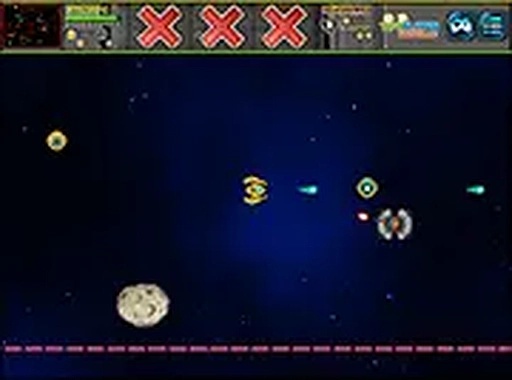
Cosmic Shield Arcade keeps its scope tight: steer, dodge, and fire through crowded space lanes using keyboard or touch input. The three modes give it more range than a typical browser arcade game, with campaign stages for structured play, a CPU opponent for reflex training, and same-screen two-player matches for local competition. Clean visuals and no violent imagery suit younger players, while instant restarts and no installation lower the barrier to entry. The main limitation is that the available information describes only local two-player play, so anyone seeking online competition should look elsewhere.
Cosmic Shield Arcade puts you in direct control of a ship navigating dense space lanes. You steer with keyboard arrow keys or on-screen touch controls, and a single tap of the spacebar or a screen press fires a burst that clears obstacles ahead. The controls respond instantly, so weaving through tight gaps remains manageable even when the screen fills with debris and hostile ships. The core loop is simple: keep moving, read the pattern in front of you, and fire only when a burst will open the lane you need.
Campaign mode runs through a series of stages, each introducing new formations and patterns to overcome. Battle vs CPU mode gives you an AI opponent whose difficulty gradually increases, making it a practical place to sharpen reflexes and learn how different formations behave. Player vs Player mode puts two people on the same screen for a friendly contest of skill. The three modes share the same flight and shooting mechanics but apply different pressure: campaign rewards route planning, CPU battles reward dodge timing, and local versus rewards unpredictability.
Clean, colorful graphics keep hazards readable, and the absence of violent imagery makes the game suitable for younger audiences. A full-screen toggle expands the view for better situational awareness, which matters most when debris and ships crowd the same lane. Because everything runs directly in a web browser, there is no installation or account creation. That makes it easy to start a quick session on any device with internet access and a keyboard or touchscreen.
Success depends on staying mobile and reading enemy movement patterns. In campaign stages, focusing on evasion while lining up precise shots tends to clear areas efficiently. Battle vs CPU mode is ideal for practicing dodge timing and learning how formations behave before facing a human. Against another player, varying your movement and shot timing can catch opponents off guard, since predictable flight paths are easy to punish.
Sign in to comment
You must be logged in before posting a review or rating.
No comments yet. Be the first to comment!




Editorial Notes